 Z9 Monitor by Z9 Systems
Every server.
One board.
Z9 Monitor shows the live state of every server, backup job, drive and piece of hardware in your company on one board – and tells the right person when something needs attention. It runs inside your network.
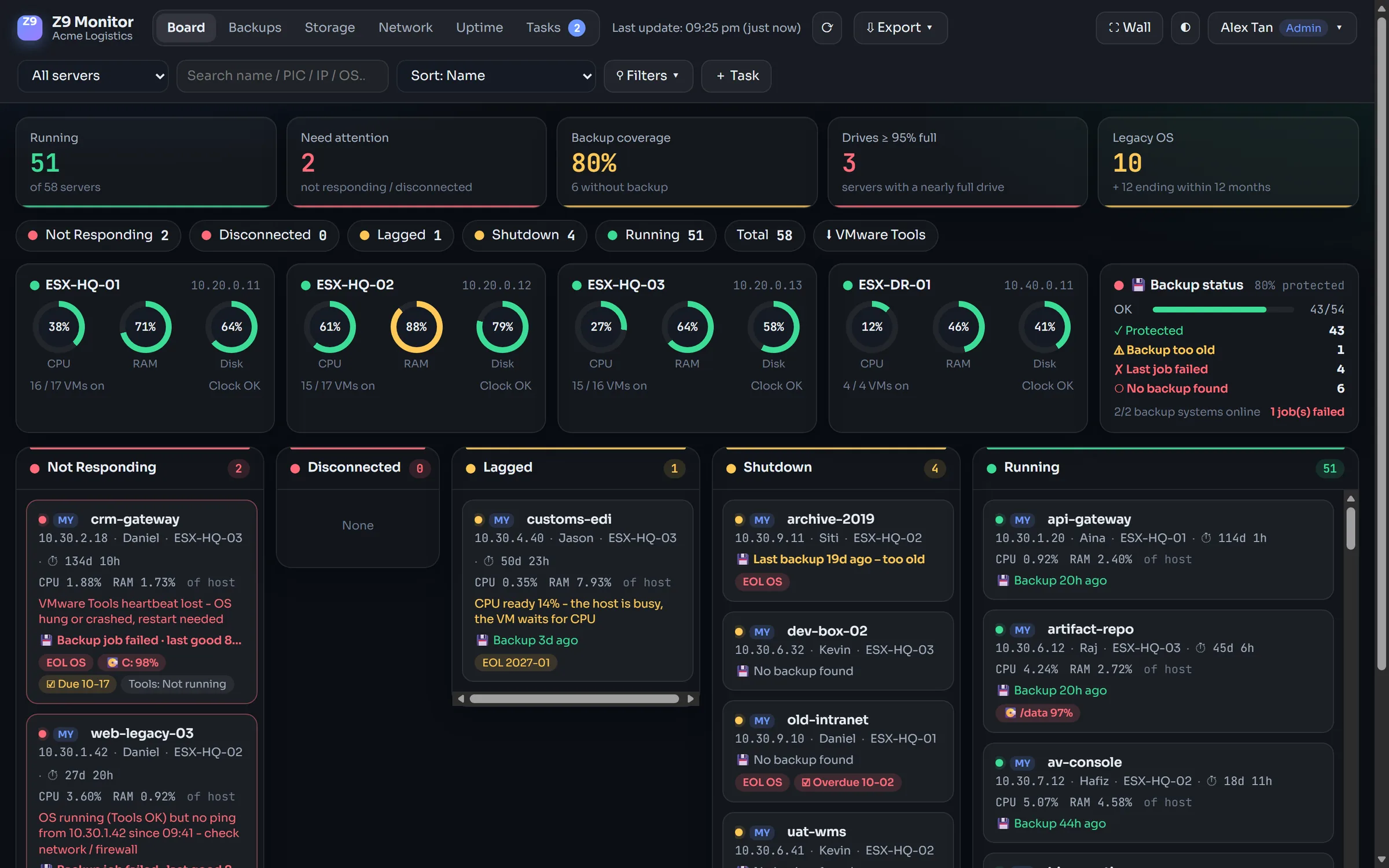
The questions IT gets asked every day, answered on one screen
Is the server down or just slow? Was it backed up last night? Which drive is about to fill up? Is a power supply failing? Who owns it?
Live server status
Power, guest heartbeat, ping and RDP/SSH checks every 15 seconds. A hung server is shown as down, even when the hypervisor still says "running".
Backup coverage
Reads Veeam Backup & Replication and Synology Active Backup for Business and lists every server without a recent restore point.
Drives, trends and forecast
Free space per drive and datastore, CPU and RAM history, and a forecast of when each drive will be full at its current growth.
Hardware and network
Fans, power supplies, temperatures, RAID and drive wear from iDRAC / iLO; switch and firewall ports and traffic over SNMP; certificates before they expire.
Reports for management
Availability per server for any period, and a monthly PDF – availability, outages, backup coverage, capacity and risks – e-mailed automatically.
Alerts that reach people
E-mail, Telegram, Microsoft Teams, Slack, WhatsApp or a webhook. Maintenance windows keep planned work quiet.
Legacy OS reminders
Every server's operating system checked against its end-of-support date; owners are reminded until the upgrade is planned.
Owners, teams and tasks
Each server has an owner and a team. Staff see their own servers; tasks such as "install VMware Tools" are assigned and tracked.
Set up in minutes
Servers come from your hypervisors automatically; names, owners, VLANs, IP records and devices can be imported from Excel templates.
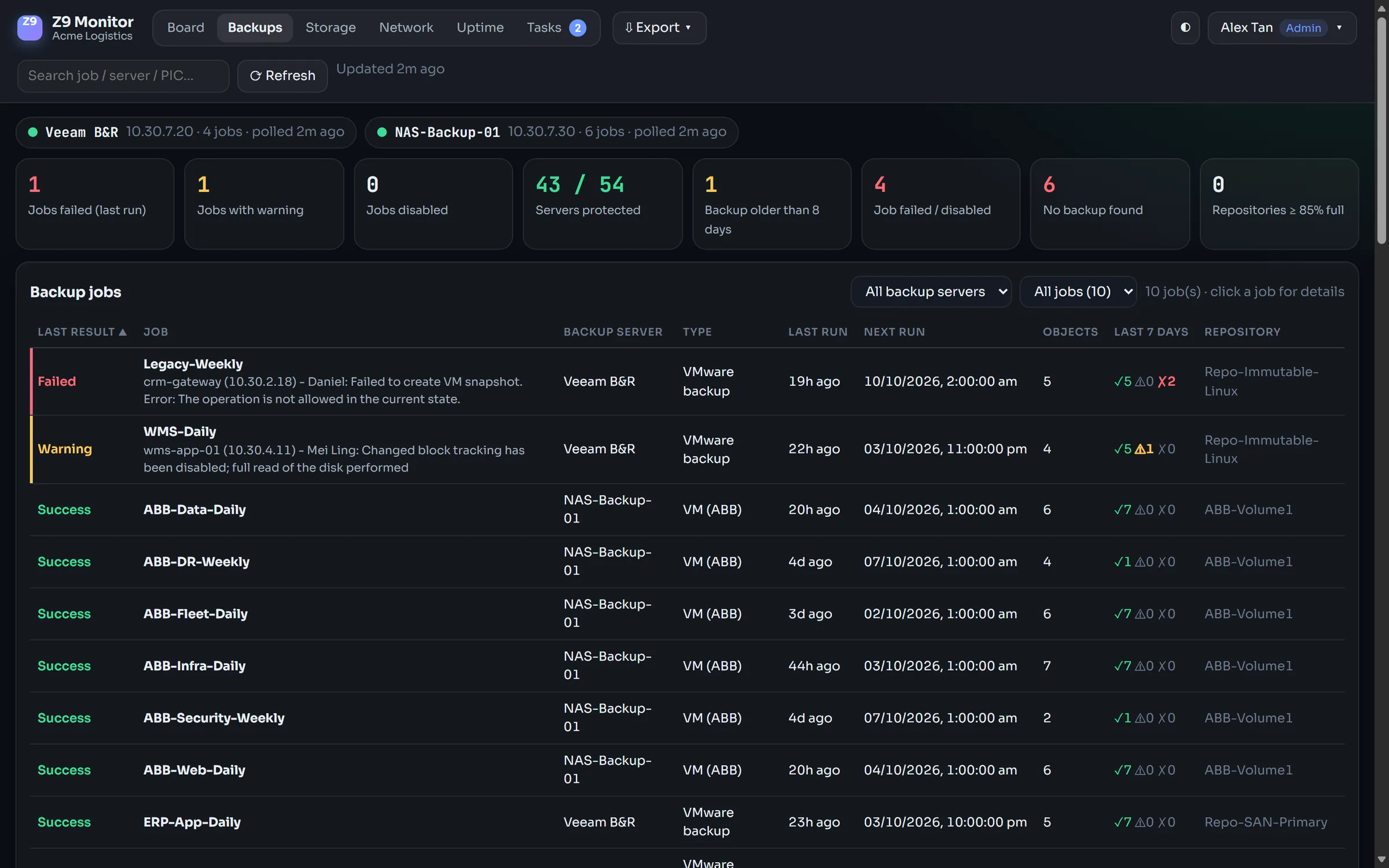
Know which servers are not backed up, before you need the restore
Z9 Monitor connects to your backup systems with a read-only account and matches every restore point to the server on the board.
- Every job's last result, with the real error text when it fails
- Servers with no backup, or a backup older than you allow
- Repository and NAS volume space, disk health and temperature
- Alert when a job fails
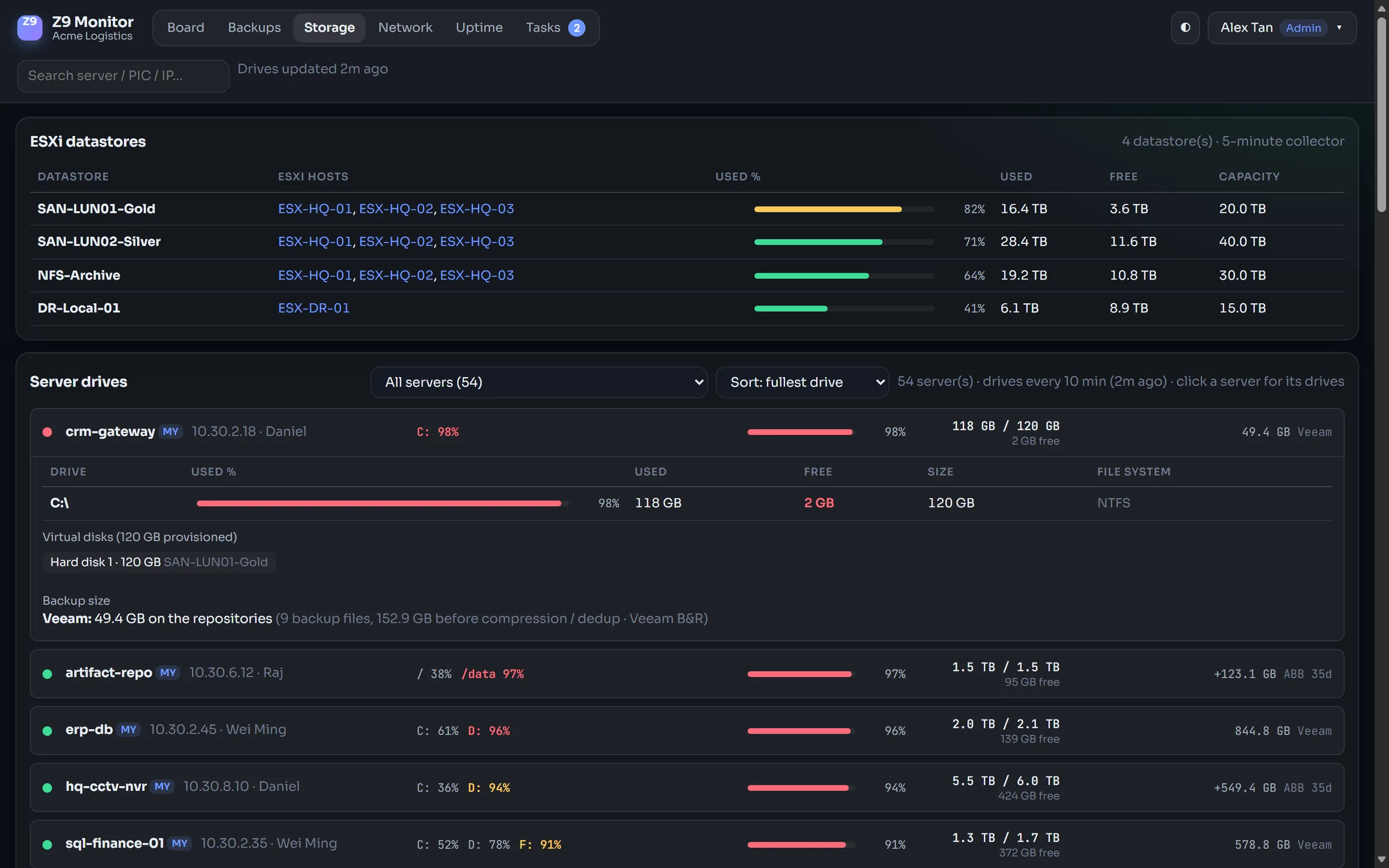
Free space on every drive – and when it runs out
Drive usage comes from the guest tools every ten minutes. The trend of the last 30 days shows how many days each drive and datastore has left.
- C:, D:, /data … with used, free and total size per server
- "Full in N days" for drives and datastores
- Shared SAN / NFS datastores across all hosts
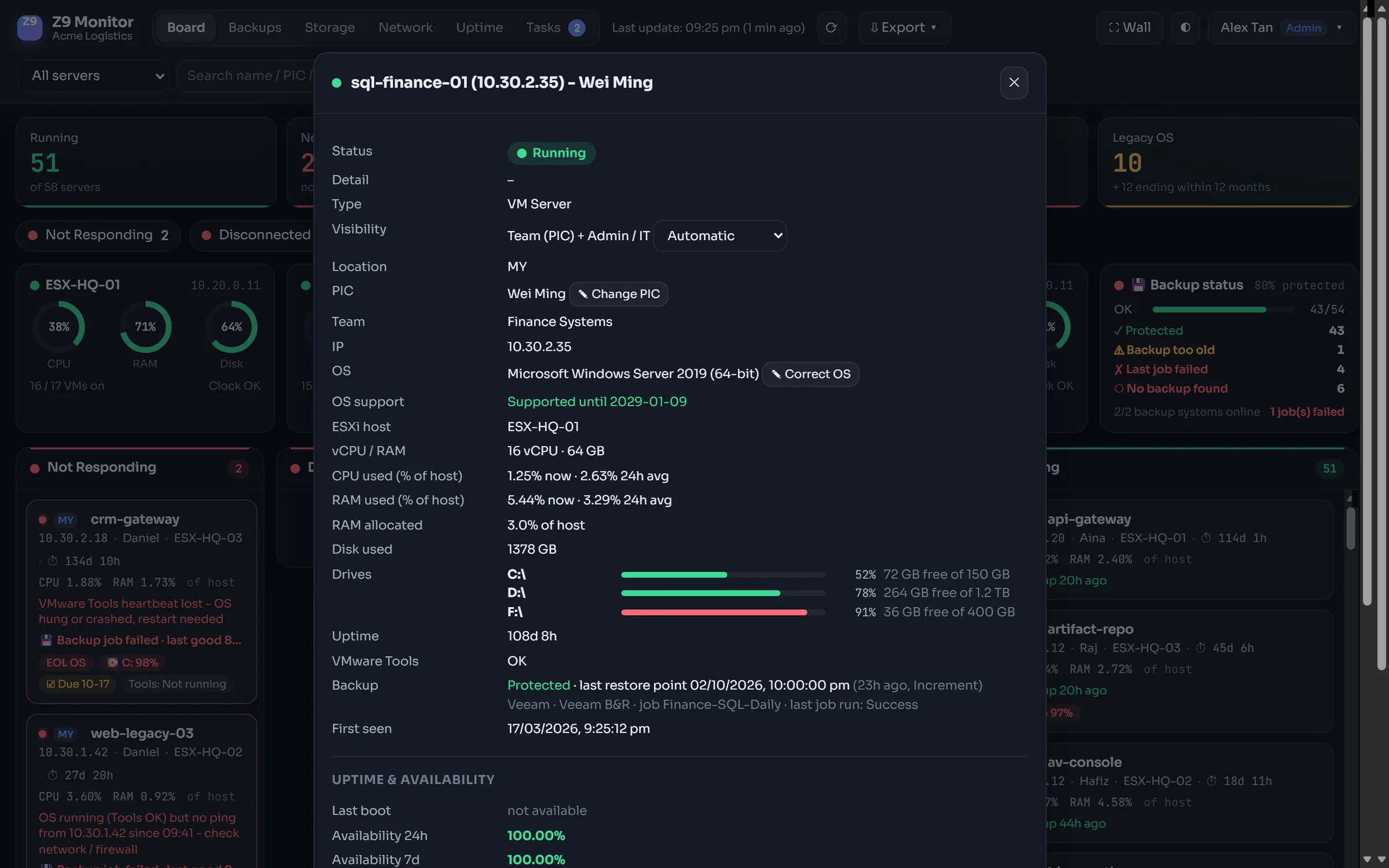
Everything about one server, one click away
Status, owner, team, operating system support, CPU and RAM trends, drives, backup, uptime, open tasks and notes in a single view.
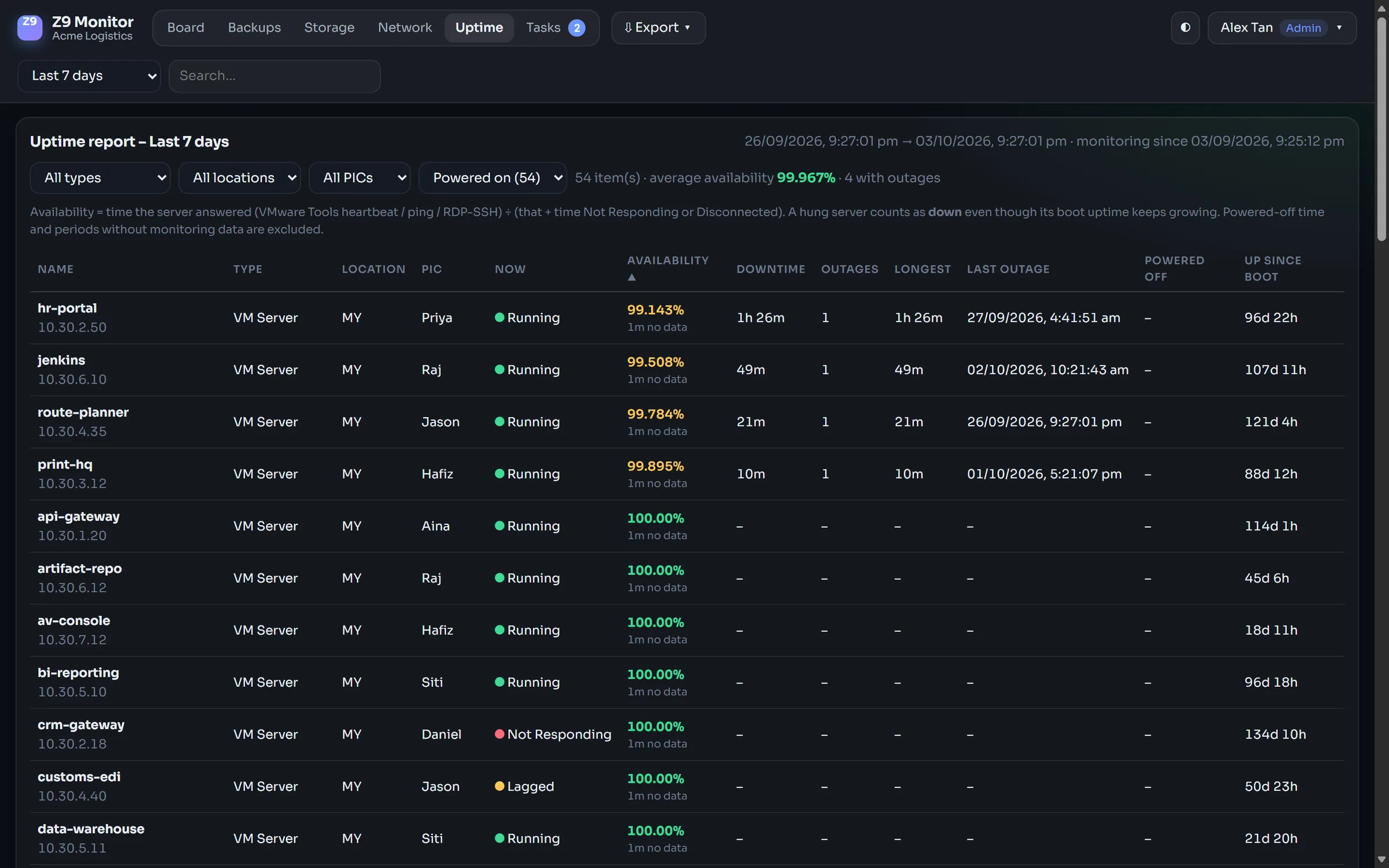
Uptime you can show to management
Availability counts the time a server actually answered, so a hung server is not reported as "up". Filter by team, location or owner, export to Excel or PDF, or let the monthly report go out by itself.
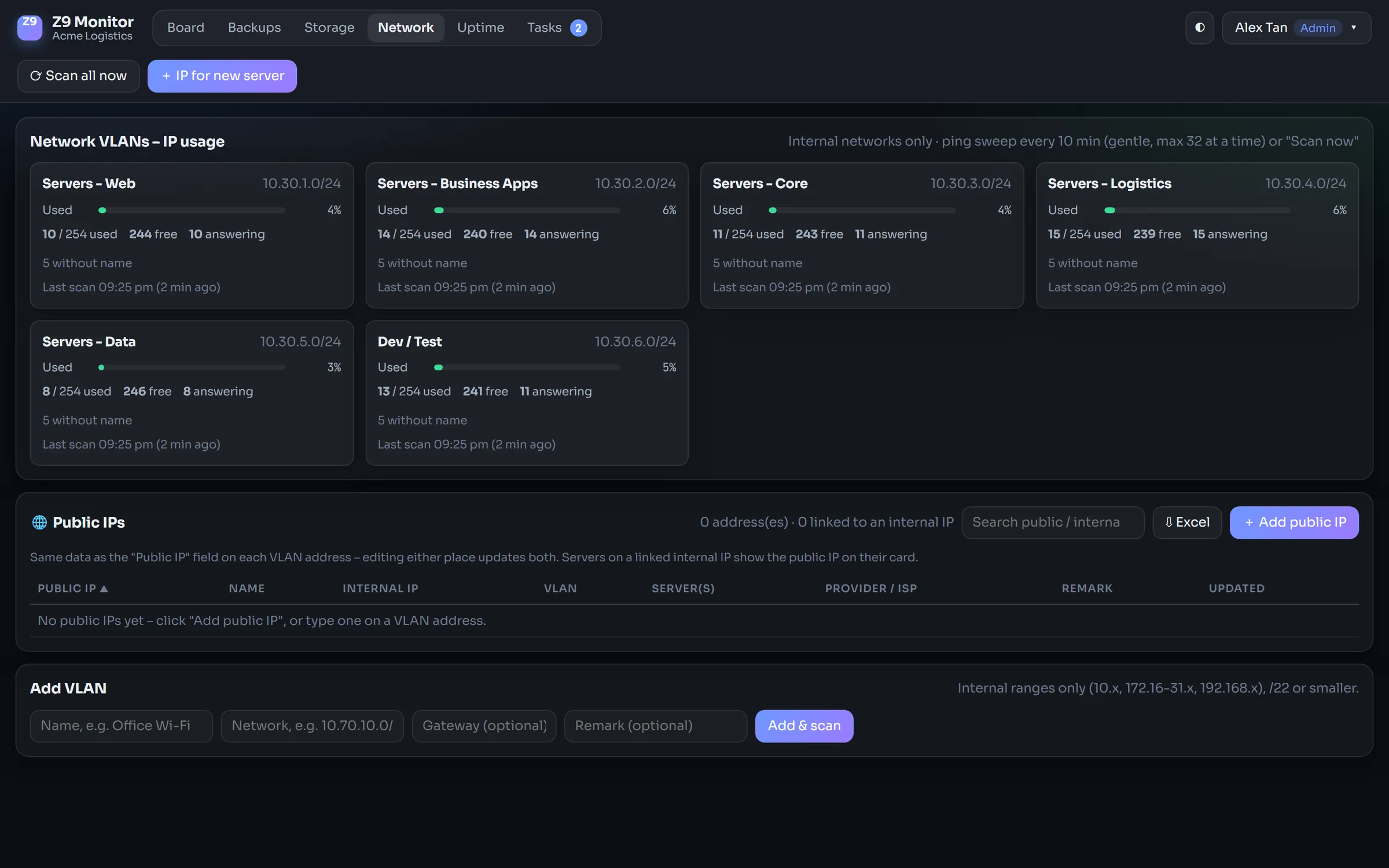
IP usage and conflicts per VLAN
Each VLAN is swept every ten minutes. See which addresses are used, by which server, and reserve a free IP for the next one.
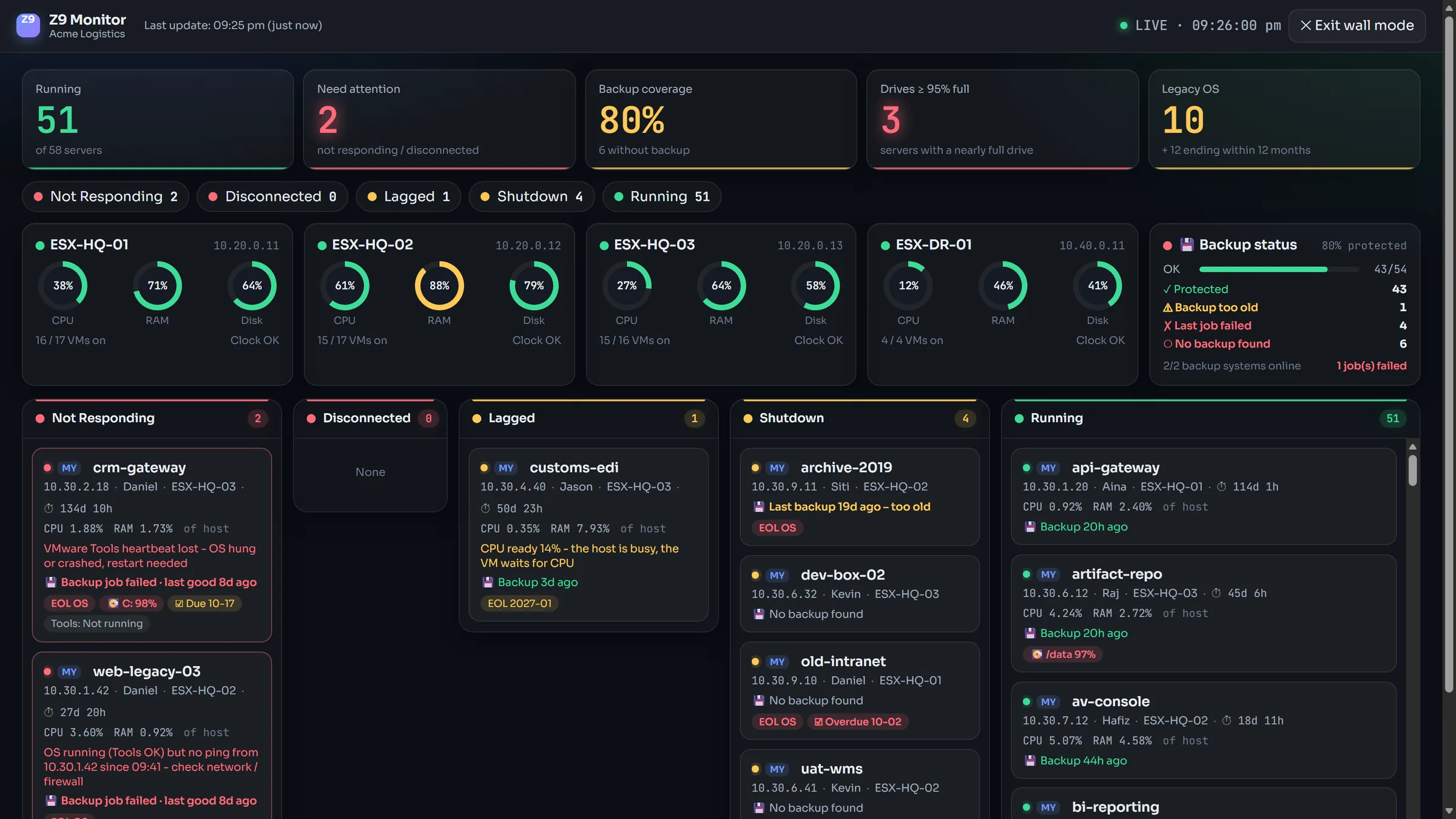
Put it on the big screen in the IT room
One click turns the board into a full-screen control-room view with a live clock. Problems pulse, so they are seen from across the room.
The systems you already run
Read-only accounts everywhere – Z9 Monitor never changes anything on your systems.
Your data stays in your network
- 01Installed on your own serverOne setup program on a Windows Server VM inside your network. Monitoring data is never sent to us or to any cloud service.
- 02HTTPS and two-factor sign-inYour company certificate or a self-signed one in one click; authenticator-app codes, required for admins or everyone.
- 03Windows accountsSign in with Active Directory; roles follow AD groups, a local admin always keeps working.
- 04Works without internetLicences can be activated offline. Fonts and all assets are built in.
- 05Team-based visibilityStaff see the servers of their own team. Hosts, storage, backup systems and management networks are for IT only.
- 06Encrypted backup & restoreThe whole configuration in one password-protected file – restore it on the same or a new server.
- 07Audit logEvery change and export is recorded with who did it and when.
- 08Your brand on topUpload your company logo; your staff see your name first.
Start small, unlock more as you grow
Sized by the number of monitored servers – hypervisor hosts are not counted. Annual subscription, or a one-time licence with yearly maintenance. One installer for every edition: the licence unlocks the features, and unused modules can be switched off to keep the screen simple.
| What you get | Starterup to 50 servers | Most popularBusinessup to 150 servers | Enterpriseup to 500 servers | Custom500+ servers · MSP |
|---|---|---|---|---|
| Monitoring | ||||
| Live board, uptime history, end-of-support reminders, Excel import / export | ✓ | ✓ | ✓ | ✓ |
| VMware, Proxmox and Hyper-V | ✓ | ✓ | ✓ | ✓ |
| E-mail alerts | ✓ | ✓ | ✓ | ✓ |
| Security – in every edition | ||||
| HTTPS with its own certificate authority, two-factor sign-in, daily encrypted backup | ✓ | ✓ | ✓ | ✓ |
| Operations | ||||
| Checks inside Windows & Linux servers – no agent: services, updates, SQL Server, IIS, antivirus | – | ✓ | ✓ | ✓ |
| Backup monitoring (Veeam, Synology) · storage forecast | – | ✓ | ✓ | ✓ |
| Teams, owners and tasks · company logo | – | ✓ | ✓ | ✓ |
| Telegram / Teams / Slack / WhatsApp / webhook alerts · maintenance windows | – | ✓ | ✓ | ✓ |
| Monthly PDF report for management | – | ✓ | ✓ | ✓ |
| Enterprise | ||||
| Compliance reports – PDPA (Malaysia & Singapore), BNM RMiT, MAS TRM, ISO 27001 | – | – | ✓ | ✓ |
| Windows (Active Directory) sign-in | – | – | ✓ | ✓ |
| Network / IP management · SNMP switches and firewalls | – | – | ✓ | ✓ |
| Hardware health (iDRAC / iLO) · certificate expiry | – | – | ✓ | ✓ |
| Wall display mode for the IT room | – | – | ✓ | ✓ |
| Custom connectors and integrations | – | – | – | ✓ |
| Free trial | Free trial | Free trial | Contact us | |
The 14-day trial includes every feature, with no credit card. Prices in MYR, SGD or USD on request – [email protected].
Questions IT managers ask us
Does any of our data leave our network?
No. Z9 Monitor runs on a server in your network and reads your systems from there. If the licence server is reachable it receives the licence status once a day (licence ID, version, number of monitored items) – never server names, IP addresses or monitoring data. Offline sites can skip this entirely.
What do we need to install it?
One Windows Server VM (2019 or newer) in your network and read-only accounts for your hypervisors and, if you use them, Veeam and Synology. The setup program installs everything – including its own database – in a few minutes, and updates install with one click.
We use Proxmox or Hyper-V. Is that supported?
Yes – VMware ESXi / vCenter, Proxmox VE and Microsoft Hyper-V are all supported, also side by side, which helps while you move away from VMware. Cloud VMs (AWS, Azure, Google Cloud) are on the roadmap.
Can staff outside IT use it?
Yes. Each person sees the servers of their own team, gets their tasks and alerts, and never sees hosts, storage, backup systems or management networks.
How is it different from PRTG or Zabbix?
Z9 Monitor is built for the questions an IT team of a mid-sized company answers every day – is it up, is it backed up, will it run out of space, who owns it – with no sensors to count and no templates to write. It is ready in an afternoon, and the licence can be perpetual.
See it running on your own servers
Download the setup program and install it on one Windows Server VM. The quick setup connects your servers in minutes – and we are happy to help.